Works inside your apps
Nova reads an app's own menus and buttons, finds the one you mean, and presses it. It asks before anything that deletes, closes or sends.
"In Logic, new audio track, and then open the mixer"
A voice for your Mac
Nova is a free assistant that lives on your Mac and listens for one word. It opens your apps and works inside them, plays your music, answers questions, remembers things for you, and teaches piano. You can use all of it without looking at the screen.
Free and open source. Version 1.1. macOS 13 or later, Apple silicon and Intel. A 4 MB download. Its natural voice arrives by itself the first time you open it.
Like talking to someone
Say it the way you would say it to a person. Nova uses the language model built into your Mac to work out what you mean, does it, and tells you what actually happened. If it is not sure, it asks. If something fails, it says so.
Nova, start an audio track in Logic.
Done: New Audio Track, in Logic Pro.
Nova, play Island in the Sun by Weezer.
Playing Island in the Sun, by Weezer.
Nova, I need to be up at half six.
Alarm set for 6:30 AM tomorrow.
Nova, remember that the recital is on Friday.
I'll remember that.
What it does
Everything below works by voice. Most of it works by keyboard and by piano keys too.
Nova reads an app's own menus and buttons, finds the one you mean, and presses it. It asks before anything that deletes, closes or sends.
"In Logic, new audio track, and then open the mixer"
Songs, artists and albums on Spotify. Anything on YouTube. Skip, pause, shuffle, and ask about the song that is playing.
"Play Harry Styles on YouTube"
The time, the weather, tomorrow's forecast, sums and conversions, and everyday questions answered by the language model built into your Mac. Nothing to sign up for.
"Do I need a jacket tomorrow?"
Notes, shopping and to do lists, alarms, reminders, focus sessions, and a morning briefing that pulls them together.
"Add milk to my shopping list"
Ask what is new in Downloads, open a folder, or find a file by name. Nova only reads and opens. It never moves or deletes.
"What was that file in Downloads?"
Where you are, what the window says, which buttons you can press. Then press one by name, or dictate text into the app in front.
"Read the window" then "Click Create"
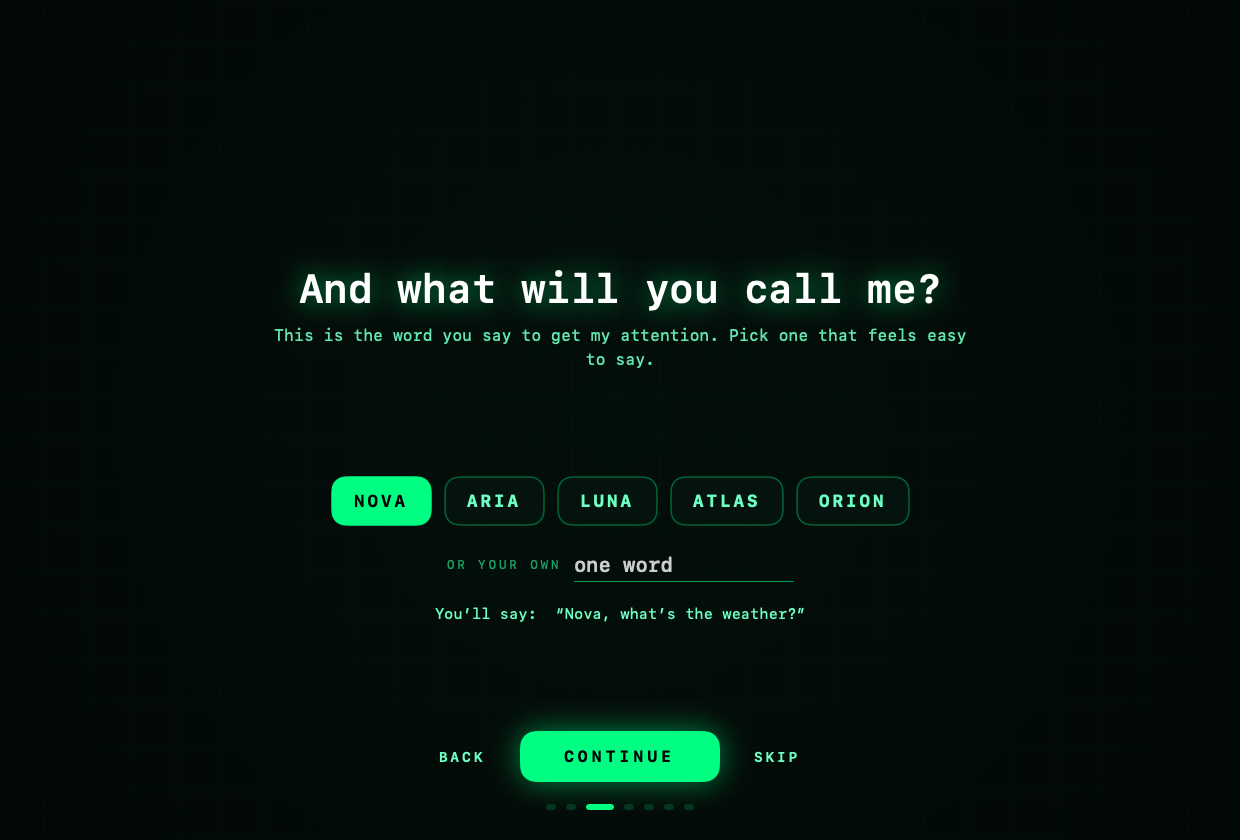
Nova, Aria, Luna, Atlas, Orion, or a word of your own. Change it whenever you like, just by asking.
"Change your name to Luna"
Close the window and Nova keeps listening. A small glowing panel rises when it hears its name, and slips away when it is done.
"Start with my Mac"
Tracks, plugins, levels, recording and new projects, by voice, with every change checked afterwards. More DAWs coming soon.
"Add a little reverb to the vocals"
Nova speaks with natural, human sounding voices that run entirely on your Mac. They download by themselves the first time, and there are nine to choose from.
"Next voice" or "audition the voices"
Things to say
Nova answers to the name you give it. Choose one here and the examples on this page change with it.
Built for every body
Accessibility is not a setting that was added later. It is where the design started, so blind, low vision, deaf and one handed users get the whole app, not a smaller one.
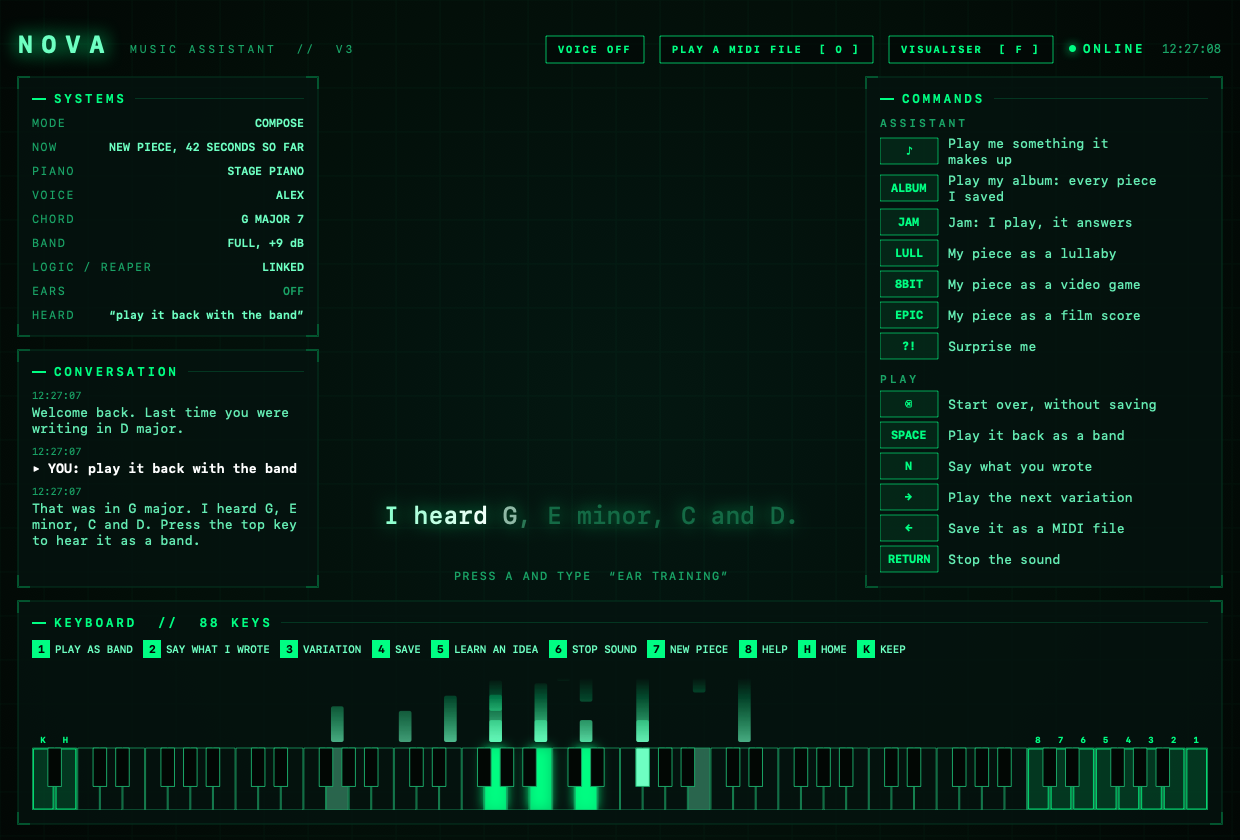
If you play
Plug in a piano keyboard and Nova becomes a teacher, a band and a notebook. No piano? Everything else still works.
Nova plays a short part, names the notes, then listens while you play it back. Calm feedback, no nagging, and it always says when you got it right.
Just play. Nova tells you the key and chords, saves it, and plays it back with a bass, strings and cello written to fit what you played.
Nine lessons on swing, the blues scale and improvising, with a walking bass and drums to play along with.
"Play me something sad." Nova writes a new piece on the spot and performs it. Turn your own piece into a lullaby or a film score.
Find the note by ear, keep time with a click you can see as well as hear, and run timed practice sessions.
Your playing as rising light, filling the window. Or watch any MIDI file fall onto the keys while it plays.
Two minutes
Get Nova.zip and open it. Drag Nova into your Applications folder. Some browsers warn about apps they have not seen often. If yours does, open its downloads list and choose to keep the file.
Nova is new and Apple has not checked it yet, so the first double click is refused. Open System Settings, go to Privacy and Security, scroll down, and choose Open Anyway next to Nova. On older versions of macOS you can instead hold Control, click Nova, and choose Open. You only do this once.
Nova asks a few easy questions: your name, what to call it, your city for the weather, your birthday if you want a greeting on the day, and how it can fit you. Every screen has a skip button.
The microphone lets it hear its name. Accessibility lets it press things in other apps. Each is asked for once, and Nova works without the ones you decline.
Works on its own. Optional extras: the Spotify app for music on Spotify, and REAPER or Logic Pro for recording.
Private by design
An assistant that is always listening has to earn that. Here is exactly what Nova does.
Questions
Yes. There is nothing to buy, no account and no subscription.
Apple shows that warning for any app it has not checked. Nova has not been through that process yet. Opening it with Control click and Open, once, tells your Mac you trust it.
Yes. All of the code is on GitHub under the MIT licence. Read it, change it, build it yourself, or send improvements back.
Yes. For Spotify you need the Spotify app installed and signed in, and your Mac will ask once whether Nova may control it. YouTube opens in your browser and needs nothing extra.
REAPER and Logic Pro today. REAPER gets the deepest control. Logic Pro is worked through its own menus, in English. More DAWs are coming.
A set of human sounding voices that run on your Mac. Nova fetches them by itself the first time you open it: a free download of about 400 MB, in the background, while it uses your Mac's own voice. You can switch this off on the last welcome screen, or say "remove the natural voice" later.
Nova uses the language model that Apple builds into macOS, on Macs with Apple Intelligence turned on. It runs on your Mac, so there is no account, no key and nothing to pay. On Macs without it, Nova still follows every request it knows. If you happen to use Claude Code, Nova can use that too, which adds answers from the web.
Nova checks this website for a newer version when it starts and twice a day. When there is one, it tells you, shows it on screen, and asks. Say yes and it updates itself in a few seconds and comes back. Say no and it asks again tomorrow. You never need to download it again or grant permissions twice.
Browsers warn about any app that is new and not yet signed with a paid Apple developer certificate, and Nova is both. All of its code is public on GitHub, so anyone can check what it does or build it themselves. To keep the file, open your browser's downloads list and choose to keep it. Safari usually does not show this warning.
No. The assistant works on its own. The lessons, the band and the composing tools appear when a MIDI keyboard is plugged in.
Listening, speaking, apps, files, notes, alarms, questions and the piano all work offline. The weather, Spotify, YouTube and the first voice download need a connection.
Yes. Choose one during the welcome, or say "change your name to" and a new word at any time. One clear word of three to twelve letters works best.
English, for now.
Quit Nova and drag it to the Bin. Its data is in the Nova folder inside Library, Application Support, in your home folder.
Open source
Nova is free and always will be. Every line of it is public under the MIT licence, so anyone can read exactly what it does with the microphone, build it themselves, or make it better.
Feedback
Nova gets better every time someone says "it did not understand me when I said this". Bugs, ideas and wishes are all welcome. Sending opens GitHub in a new tab with your message ready, where you can follow what happens to it. You need a free GitHub account to post.